
Free AI Worksheet Generators for Teachers, Tested (2026): 8 Tools Compared — What’s Actually Free
Sunday night, 9:47 PM. Three preps tomorrow and a worksheet for 2nd period that doesn’t exist yet. You type “free AI worksheet generator for teachers” into Google, and every result promises the moon — for free, obviously.
The direct answer: these tools turn a topic, a PDF, or a few typed lines into a printable worksheet — usually with an answer key — without charging you. The free options are real but fenced: of 8 tools I checked in October 2026, only two generated anything without an account, and every “free forever” plan caps you between 3 free tries and 10 generations a month. Flint’s Sparky and StudyGlen came out strongest; myenglishpages is the best truly-free ESL pick.
- Best all-round free pick: Flint’s Sparky — free for teachers, no stated generation cap, proper math typesetting, FERPA/COPPA/GDPR built in.
- Best for auto-graded digital worksheets: StudyGlen — 1 free worksheet a day, no credit card, OCR from PDFs and images.
- Best no-sign-up options: Teach2Tales (3 free creations, no account) and myenglishpages (10/month, no login).
- The catch, everywhere: “free” always has a fence. Know yours before you build a week’s plans around a tool.
In October 2026 I read all 8 tools’ official worksheet and pricing pages line by line — free-tier caps, sign-up gates, prices, exports, privacy claims. Same checklist, same week. I didn’t create accounts or upload student work; anything unverifiable without signing up, I say so. Diffit’s figures come from third-party comparisons citing its pricing page — flagged below. Everything else verified October 20, 2026.
What “free” actually means: the limits table
This is the table I wish existed when I started. Every “free” plan has a fence — here’s where they are, read verbatim from the official pages:
| Tool | Free tier | Sign-up? | Answer key | Export |
|---|---|---|---|---|
| Flint (Sparky) | Free for teachers; “no limit on how many worksheets you can make” | Account (via app) | Yes, own section | Print, Google Docs, Word |
| StudyGlen | 1 worksheet/day, no credit card; credit packs from $4.99 (never expire) | Yes | Yes + auto-grading | PDF, Word, CSV, QTI |
| EasyClass | $0 forever; 10 chats/month (one chat = one worksheet + key) | Yes | Yes, last page | PDF, Word, print |
| Teach2Tales | 3 free, no signup; Pro exists (price n/s) | No | Instant scoring (tests) | Print-ready; formats not stated |
| myenglishpages | 10/month, $0 forever; Pro $9/mo or $79/yr | No | Yes, optional | Copy/PDF (Word = Pro) |
| Taskade | Free starts with no AI credits (earn or buy packs); Pro $10/mo annual | Yes | Yes, auto; step-by-step math | Markdown, PDF, HTML, JSON |
| MagicSchool | $0 Forever Free (80+ tools); cap not stated | Yes | Auto-appended* | PDF, Docs, Word |
| Diffit† | Basic $0; Individual $14.99/mo | Yes | Not stated | PDF (Google/Microsoft = paid) |
*MagicSchool key behavior via educatorstechnology.com (third party). †Diffit figures via third-party comparisons — approximate.
Before you compare tools, answer one question: digital or printable?
I almost put this section first, and honestly I should have. Before you read a single tool verdict, answer this: does this worksheet need to be digital, or printable? Half the frustration I hear from colleagues comes from picking a great tool for the wrong job.
Pick digital if you want the thing to mark itself. StudyGlen’s whole pitch — auto-graded worksheets with AI explanations for every answer, QTI export for Canvas or Moodle — only pays off if your kids have devices and you actually collect the scores. Digital costs you setup time and pays you back in grading time. If you’re not using the scores, you’re paying the setup tax for nothing.
Pick printable if the worksheet is practice with a pencil. Flint’s Sparky, EasyClass, and myenglishpages live here — describe what you need, print it, hand it out. Flint’s own FAQ puts its free tier bluntly: “free for teachers, and there’s no limit on how many worksheets you can make,” which is why it won my all-round pick. The cost of printable is all yours: you print it, and you are the quality control. A colleague printed an AI-made fractions worksheet last spring with three wrong answers in the key — the kids found all three before she did. Nobody’s doing that to me again: every math key gets checked by hand before it hits the copier.
The third lane: beautiful. If the worksheet goes home to parents or into a portfolio, Canva for Education is free for teachers and nothing else on this list makes a page look like that. Its own comparison notes are honest about the trade: Canva’s AI drafts only short quizzes from text already in the design — treat it as a layout tool, not a generator.
Decide this in thirty seconds. Everything below reads cleaner once you know which lane you’re in.
(Source verification: StudyGlen’s auto-grading, QTI export, “1 worksheet a day” and “$4.99 credit packs, credits never expire” — studyglen.com/guides/ai-worksheet-generator, updated Oct 18, 2026. Flint’s “no limit on how many worksheets you can make” FAQ — flintk12.com/tools/ai-worksheet-generator, updated Oct 13, 2026. Canva AI quiz limits — StudyGlen’s comparison page.)
The 8 tools, one by one
Same checklist for each: the official worksheet page, then pricing, then whatever they say about privacy. Here’s what I found.
1. Flint (Sparky) — the math teacher’s best friend
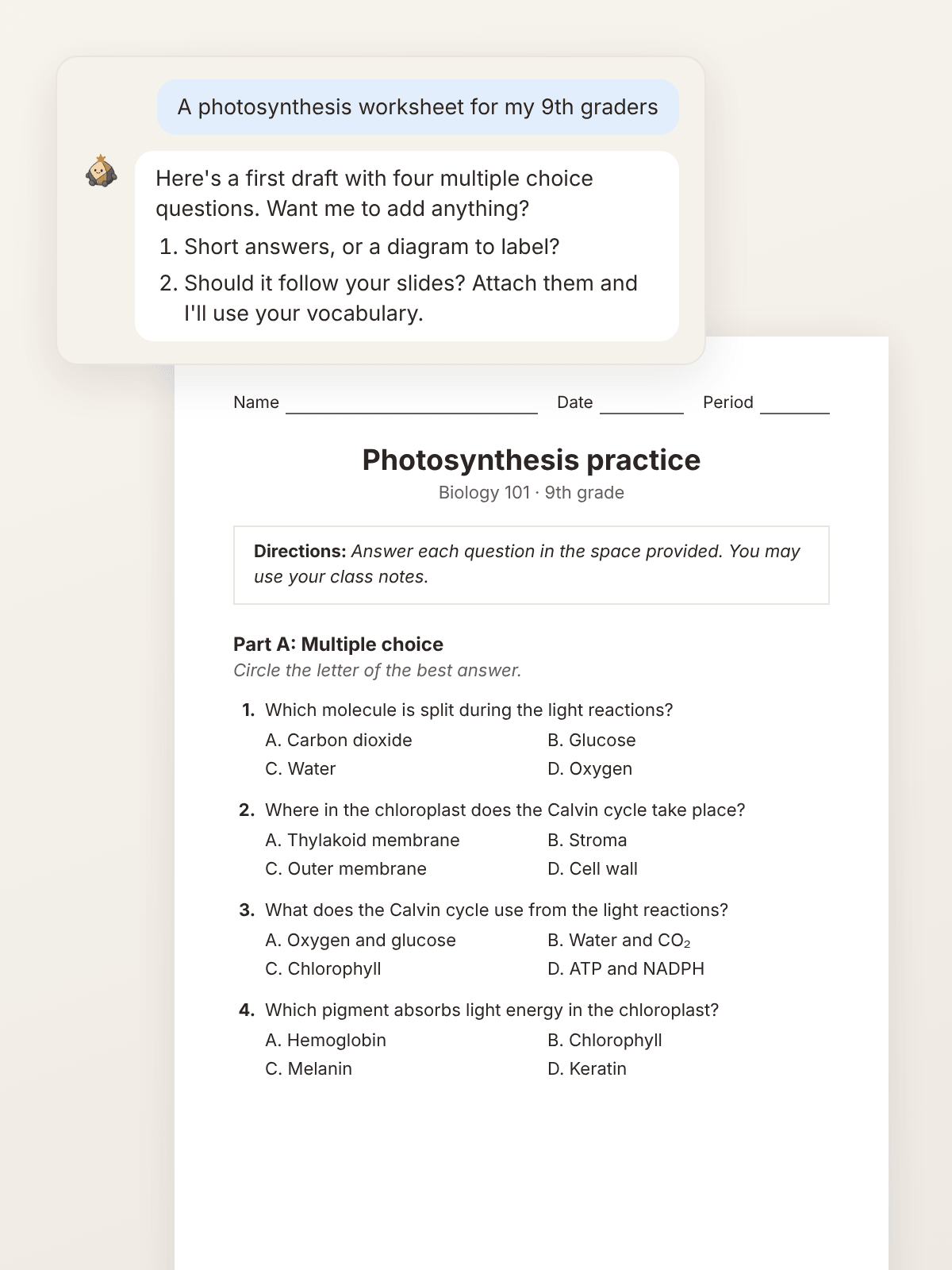
Flint’s worksheet generator lives inside Sparky, its AI assistant, and it was clearly built by people who’ve watched a math worksheet go wrong. Describe what students should practice — “two-step equations for 7th grade” — or attach your slides, and Sparky writes the worksheet in a document next to the chat: directions, questions in order, answer key at the end.
Equations are typeset like a textbook, Sparky uses a calculator for the arithmetic so the key holds up, and graphs get plotted at exact values. Ask for an easier version with a worked example or a harder one for early finishers — each with its own key. Export to print, Google Drive as a Google Doc, or Word. The free tier is the most generous I found: Flint’s FAQ says the worksheet maker is “free for teachers, and there’s no limit on how many worksheets you can make.” Privacy is the most explicit of the eight — FERPA, COPPA, and GDPR standards; student data never used to train models, never shared.
Best for: math/science teachers who need a trustworthy key. Watch: runs inside the Flint app — expect an account step.
2. StudyGlen — best for turning your materials into practice
StudyGlen starts where you are: upload a PDF, paste text, or scan an image — even a photo of a textbook page — and it generates an auto-graded quiz-worksheet with AI explanations for every answer. OCR is built in, with 41 languages and auto-detection.
The free account gives you 1 worksheet every day, no credit card — one of the more generous daily allowances I found. Need more? Credit packs start at $4.99 for 10, pay-once, credits never expire. Exports: PDF, Word, CSV, QTI for LMS import.
The honest limits, from their own comparison page: no layout designer (fixed template — export to Word to restyle), no drag-and-drop or matching questions yet, no live Google Classroom sync. For a free daily worksheet from your chapter PDF? Hard to beat.

Best for: turning your PDFs and slides into practice. Watch: fixed print template — export to Word to restyle.
3. EasyClass — the one that makes actual pages
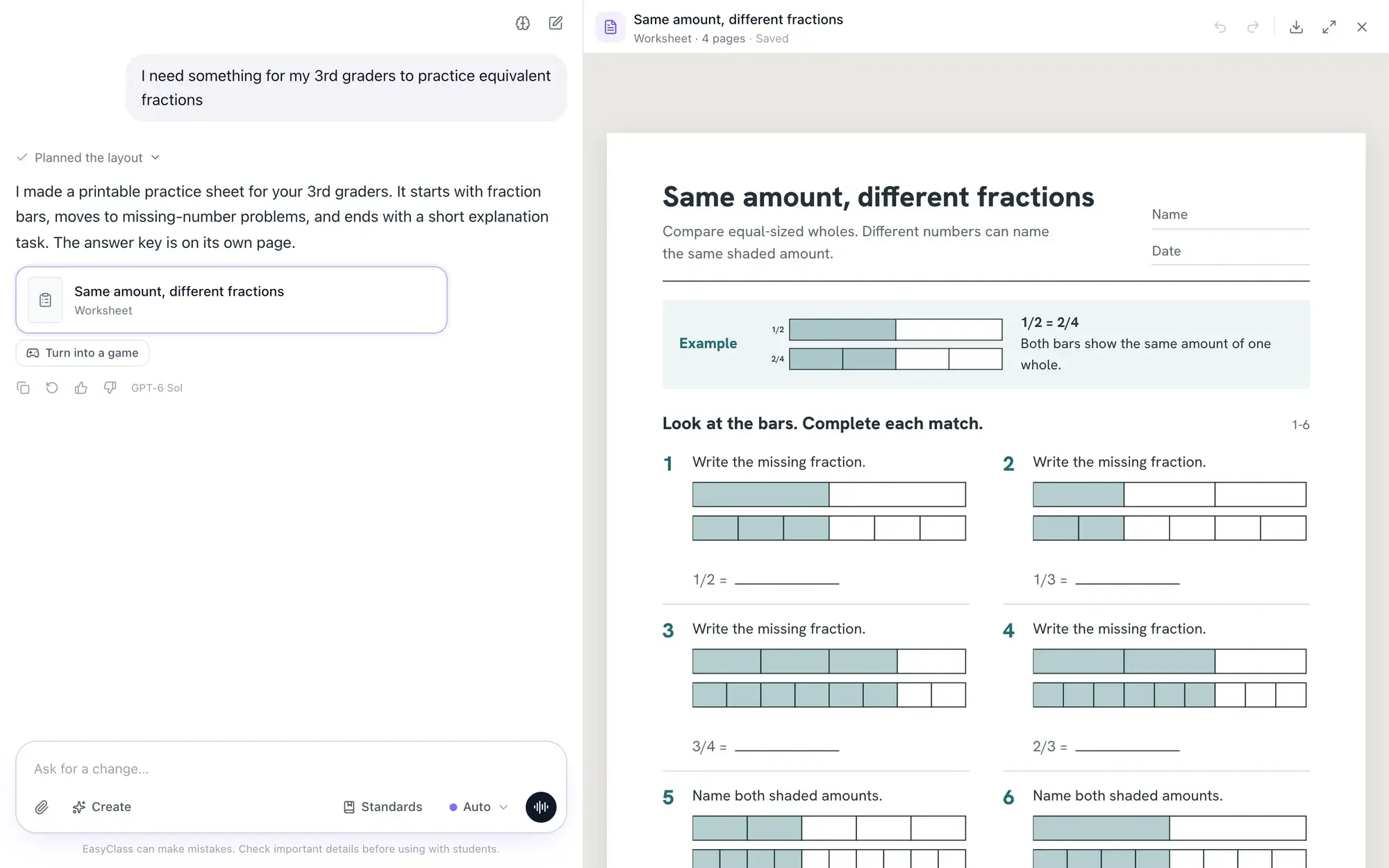
Most AI tools hand you a wall of text and leave the formatting to you — which eats the time you just saved. EasyClass makes the page itself: describe what you need in a chat, and it builds a US Letter document with real layouts — questions with lines to write on, math problems with exact visuals, answer key on its own last page. For math sets, code checks the numbers so the key matches.
Free plan: $0 forever, no credit card, 10 chat messages a month — one message makes a whole worksheet with its key. Revision requests count too, so “make question 4 harder” spends a message. Pro is $12.99/month or $49.99/year. You need an account (Google or email) — verified in my no-sign-up test.
Best for: print-first teachers who want finished-looking pages. Watch: the 10-message monthly cap covers revisions too.
4. Teach2Tales — the no-account standards specialist
The surprise of this list. Teach2Tales generates standards-aligned practice tests, worksheets, and stories for K-12 — and its free tier (3 free creations) needs no signup at all. Rare air.
Its strength is standards coverage: all 50 US states’ frameworks, with authentic item types — drag-and-drop, hot spot, hot text, inline choice, multi-select, match grid. A Pro tier exists (price not stated); worksheet answer keys and export formats aren’t explicitly stated — the site is young.

Best for: US state-test prep, no sign-up. Watch: test-prep flavored — not for open-ended creative work.
5. myenglishpages — the truly-free ESL pick
Ten worksheet generations a month at $0 forever — no login, no credit card, reset monthly. Type any grammar point or vocabulary topic, pick a CEFR level from A1 to C1, set 5–20 questions, and it generates exercises with the answer key included. Their own disclaimer: review the key before distributing — “occasional errors can occur.” Refreshingly honest.
Free gets all exercise types and all CEFR levels; Pro ($9/month or $79/year) adds unlimited generations, Word download, and a full lesson-pack generator. Free users copy the output or download as PDF — fine for most classroom use.
Best for: ESL/ELL teachers, zero friction. Watch: ESL-only.
6. Taskade — the workspace that happens to make worksheets
Taskade isn’t a worksheet company — it’s a collaborative workspace with an AI worksheet generator inside. Generate from any topic or standard, and the output lands in a Taskade project you can view as a list (printable), a table (handy for answer-key grids), or a mind map. Answer keys generate automatically, with step-by-step math solutions.
The catch, from their own blog: the free tier “starts with no AI credits” — you earn credits or buy a pack, and the generator shares that pool. Math worksheets are text-based. Pro is $10/month billed annually. Worth it if your department already uses Taskade.
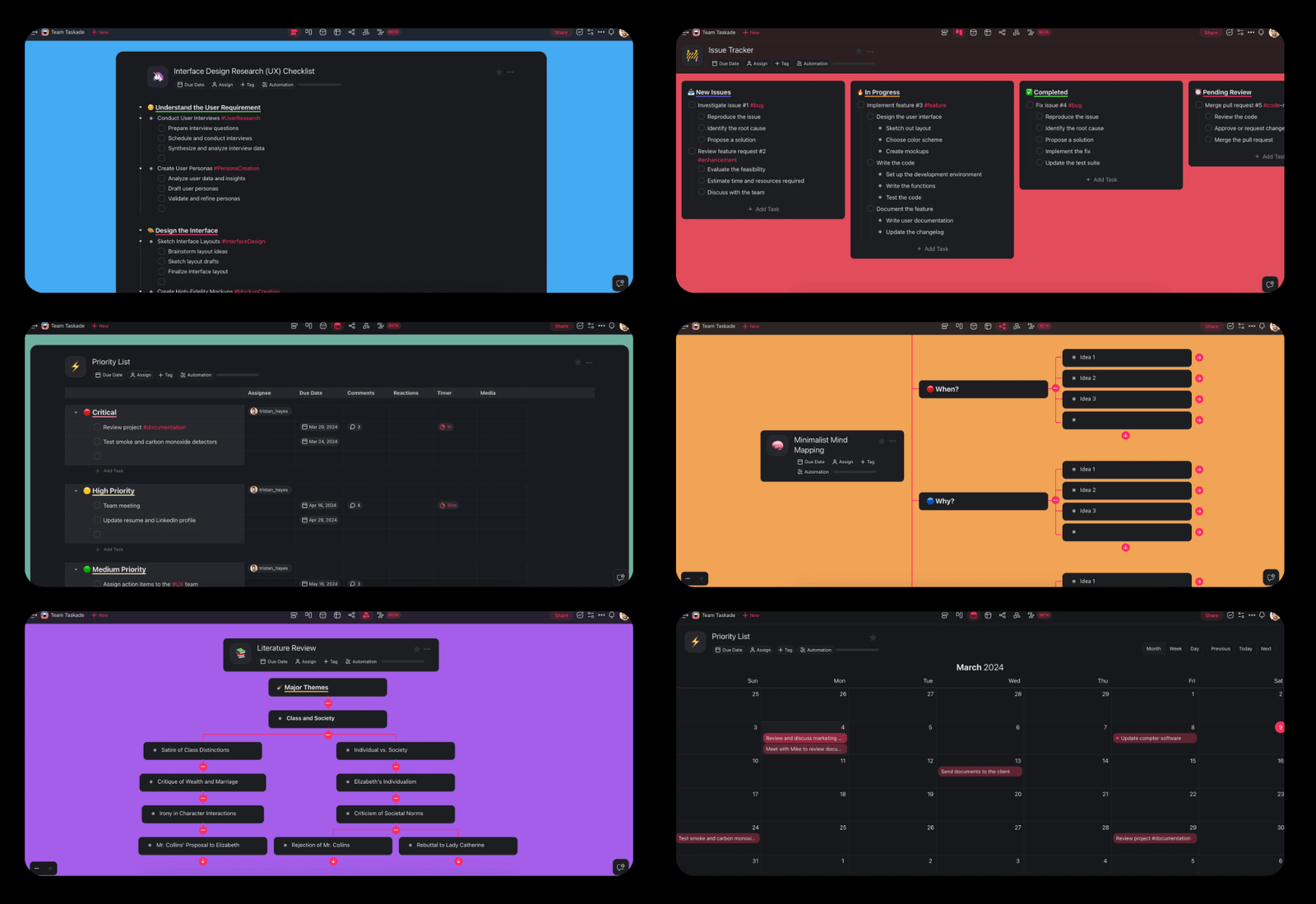
Best for: teams already in Taskade. Watch: the shared AI-credit pool.
7. MagicSchool — the suite you might already have
MagicSchool’s rebuilt Worksheet Generator 2.0 (July 2026) makes classroom-ready worksheets across any subject: pick a template, preview the layout, refine in Studio Mode, export to PDF, Docs, or Word — with leveled versions in one workflow and standards-aligned question sets. It sits inside a Forever Free plan with 80+ teacher tools: your worksheets live next to your lesson plans, one login instead of five.
The free tier’s exact generation cap isn’t stated (Plus at $12.99/month, or $8.33/user/month annually, unlocks “unlimited generations” — so free is fenced somewhere). Privacy is enterprise-grade: SOC 2–certified, FERPA/COPPA-compliant. No product screenshot here — their pages served only brand collage, so judge it on the free tier, not the marketing.
Best for: MagicSchool users wanting one login. Watch: generalist — dedicated tools go deeper on layout and math.
8. Diffit — the differentiation specialist
Diffit approaches worksheets sideways: paste or upload a text and get reading-level-adjusted versions, vocabulary lists, and comprehension questions — the strongest pick when your 3rd period spans four reading levels. I’d pair it with any tool above: generate the core worksheet in Flint or StudyGlen, level it in Diffit. It also anchors my differentiation workflow.
Transparency note: Diffit’s own site wouldn’t render its marketing pages (bare app shell), so these figures come from third-party comparisons citing Diffit’s pricing page — Basic free tier with a set number of adaptations, Individual Teacher $14.99/month or $149.99/year. Treat as approximate.
Best for: mixed-ability classes; instant leveled versions. Watch: reading-centric, not for equation-heavy math.
The math problem nobody warns you about
Most AI worksheet generators are text generators wearing a worksheet costume. Ask for algebra practice and you get “Solve for x: 2x + 5 = 13” as flat text — fine to read, miserable to print, and the “answer key” is more flat text nobody checked.
Flint is the exception: textbook-style typesetting, calculator-verified arithmetic. EasyClass gets partial credit — exact visuals with room to work, and code checks the numbers. Taskade gives step-by-step solutions but stays text-based. Everyone else: fine for ELA and social studies; check every math answer yourself before printing 30 copies.
A colleague printed an AI-made fractions worksheet last spring with three wrong answers in the key. The kids found all three before she did. Rule of thumb: if the tool can’t show you a rendered equation on its own product page, assume you’re the quality control.
What happens to the stuff you upload? (The FERPA question, plainly)
Uploading your own lesson materials is a completely different risk level from uploading student work. Your slides are fine almost everywhere. A scanned worksheet with kids’ names and grades is student data — treat it under FERPA.
What the official pages say: Flint is clearest — FERPA, COPPA, GDPR; student data never used to train models, never shared. MagicSchool is SOC 2–certified and FERPA/COPPA-compliant. EasyClass doesn’t attach roster names to what the AI sees and doesn’t train on student work. StudyGlen is “designed with privacy in mind” but makes no FERPA claim. Teach2Tales, myenglishpages, and Taskade state nothing on student-data privacy that I could find.
My rule for a new teacher: never upload anything with student names, photos, or grades into a free AI tool unless the vendor explicitly addresses student data. Anonymize first — initials, no photos — or stick to your own materials. Thirty seconds, worry over.
My 15-minute Sunday-night worksheet workflow

Enough theory — the actual routine, in order:
- Minutes 0–2: pick by subject. Math/science → Flint. ELA/social studies → StudyGlen or EasyClass. ESL → myenglishpages. State-test formats → Teach2Tales.
- Minutes 2–5: generate with specifics. Not “fractions worksheet” — “4th grade fractions worksheet, 12 problems, visual models for the first 4, word problems for the last 4, answer key separate.” Attach your slides or chapter PDF where supported.
- Minutes 5–10: read it like a skeptic. Check every answer (especially math), scan for reading-level mismatches, and hunt the classic AI tell — three questions that are secretly the same question.
- Minutes 10–13: level it. Ask for an easier version with a worked example and a harder extension. Two minutes now saves inventing early-finisher work at 8 AM.
- Minutes 13–15: export and file it. PDF for printing, Word for next term’s tweaks. Save the prompt that worked — next week’s worksheet is the same prompt with a new topic.
The first worksheet costs 15 minutes; the tenth costs 5, because you stop re-learning the tool.
FAQ
Are there any completely free AI worksheet generators with no sign-up?
Yes, but limited: Teach2Tales gives 3 free creations with no account, and myenglishpages gives 10 generations a month with no login. Everything else I checked needs at least a free account — which deserves the same skepticism I applied in my no-sign-up lesson planner test.
Which free AI worksheet generator for teachers is best for math?
Flint’s Sparky, clearly — the only one I found that typesets equations properly and verifies answers with a calculator. EasyClass is second for print layout. For every other tool here, check each math answer yourself before printing.
What’s the catch with “free forever” plans?
Caps. StudyGlen gives 1 worksheet a day, myenglishpages 10 a month, EasyClass 10 chats a month, Taskade starts free users with no AI credits — every free tier I verified has a fence. Read the limits table before building a routine around a tool, and re-check yearly: free tiers shrink quietly.
The bottom line
There’s no single “best” here — there’s a best one for your Tuesday. Math? Flint. Chapter PDFs? StudyGlen. Allergic to sign-ups? Teach2Tales or myenglishpages. Print-perfect? EasyClass. Already in MagicSchool or Diffit? Stay there. The free tiers are real, the caps are real too — pick one from the table, generate tomorrow’s worksheet tonight, and judge it on that. That’s the only test that counts.
Building the bigger toolkit? My tested guide to free AI lesson plan generators covers planning the same way. And here’s who’s behind these tests.
Add TeachersTool as a Preferred Source in Google Search — open any of our articles in Google, tap the star/source icon, and choose TeachersTool. You’ll see our newest teacher-tested AI guides first.
Last updated: October 20, 2026. Free-tier terms and prices were verified from official tool pages on October 20, 2026 and change fast — if you spot something outdated, let us know and we’ll re-check and correct it.
Get One Useful AI Tool Tip Every Week
Get One Useful AI Tool Tip Every Week
One practical AI tool tip in your inbox every week. No spam, unsubscribe anytime.

We’re the team behind TeachersTool. We hands-on test AI tools for teachers — signing up for free plans, taking real screenshots, and fact-checking every claim before publishing. Our guides cover lesson planning, quiz creation, grading, and classroom AI workflows.
Enjoying TeachersTool guides?
Add us as a Preferred Source on Google — you'll see our latest tools and guides first in Search, Top Stories, and AI Overviews.